Lichess Summer Update, Part 1
Lichess has gone through some changes over the summer...

A lot has happened since our last update in April. For instance, Portugal won the 62nd Eurovision Song Contest, “Oslo” won the 2017 Tony Award for Best Play and African Development Bank president Akinwumi Adesina won the 2017 World Food Prize.
At Lichess, we have been very busy building a better chess experience for our users. So much so, that we needed to split this summary of what we have done since April into two parts. The second update will be posted in about a week’s time. Enough chit-chat, let’s take a look at some of the improvements we have made.
Performance improvements

Important web technologies are moving forward, and so are we. This summer, we rewrote almost every bit of user interface for greater performance and robustness. While most of the changes are not visible to the naked eye, every page is and feels much snappier. In fact, the pages on lichess.org became so light and fast, that the only way we could make them even faster was to remove the Google Analytics tracker. So we did.
Translation improvements

The aging lichess translation center is now replaced with Crowdin, a dedicated website for user-contributed translations. As a non-profit, we get it for free! How cool is that? Thanks to Crowdin and Lichess development work:
- More sections of the website can now be translated; we’re still working towards 100%
- Regional dialects such as Brazilian Portuguese and U.S. English are now supported
- Pluralization is now handled correctly - did you know Arabic has 6 plural forms?
- Language subdomains are gone, it’s now lichess.org instead of en.lichess.org
- It’s easier than ever to contribute translations. Come give us a hand!
Study improvements
Study is a very flexible and powerful tool used for a wide range of tasks, be it analyzing your own games or Grandmaster games, studying openings or endgames, and collaborating with other people in real time or sharing valuable analysis and advice with others.
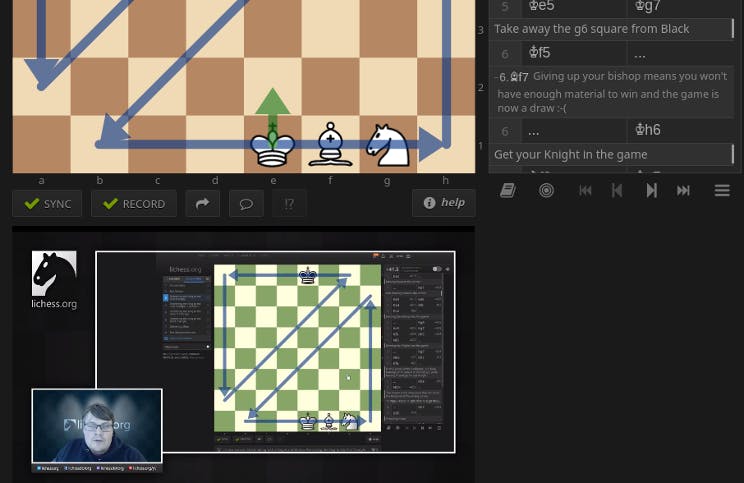
Sync button

If synchronization is enabled for the study (it’s a study setting), viewers of a study will be continually updated with any changes made by a Study collaborator. However, any viewer can now use the new SYNC button to temporarily turn this synchronization off locally. This is useful if you want to look at, or change something other than what the contributor is currently doing, like adding a different variation or working in another chapter of the study.
Record button

As a study contributor you will also have access to the RECORD button which allows you to control whether the moves you enter into the study are actually saved or not. If you make moves with the RECORD button turned off, other viewers will not see those moves, and they will not be saved to the server. This is useful if you want to do some temporary analysis/exploration not worth sharing or saving.
Visibility: Unlisted
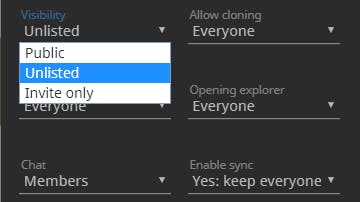
In addition to being “public” or “invite only”, studies can now also be “unlisted”. Unlisted studies work the same as unlisted YouTube videos. Anyone can access an unlisted study through its URL, but they do not show up in search results. You can use this to share a study with a group of people without having to individually invite them all.
Pinned comments
Within a study chapter, you can already add comments to individual moves. It is fairly common to add a comment to the initial position of a chapter to make introductory comment about the whole chapter. Now you can enable the “pinned comment” setting on a chapter in order to get a new comment field that will be visible no matter which move in the chapter you have navigated to. This is useful for making general comments that applies to the whole study chapter. It even supports embedding YouTube videos, which means you can make moves on the board while the video is playing.
Other Study improvements
- Within the study setting you may allow anyone to chat within your study. Study contributors have chat moderation tools available to them.
- Study now also displays clock times whenever the data is available
- Creating a new chapter from a custom position now defaults to the current position instead of the initial position of a standard chess game
Usability improvements
- Updated user interface for the user menu in the top right
- Smoother user experience when rematching the opponent after a game
- Updated user interface for the tournament schedule
Other improvements
- Improvements to the Stockfish engine, which affect game analysis as well as games vs AI. The Stockfish team have made vast leaps in crazyhouse playing strength, and this engine is now miles ahead of all previous work.
- More hyperbullet (½+0) tournaments and a revamped crazyhouse tournament schedule
- Lichess cloud evaluation is now available for chess variants
- Better moderation tools
- A very large number of small tweaks, style improvements, and bugfixes
Thanks to your donations, Lichess is now able to pay @thibault a modest salary.
Stay tuned for Lichess Summer Update, Part 2!